
Trafficity Troubleshooting: When the Problem Is Not Traffic
Fix the non-traffic problems in Trafficity: buildings that will not grow, cars that ignore a road, junctions that lock and frame drops in a big city.
Not every stuck city is a traffic problem. Trafficity's economy is simple, but simple does not mean obvious: a residential block can refuse to grow because it cannot reach a shop, a factory can sit idle because no worker can get to it, and a junction can look jammed when the real issue is a missing lane connection three blocks away.
This page is the checklist for those cases. If the overlay is red and the cause is clearly congestion, use bottleneck diagnosis→ instead.
Buildings that will not grow
If a district stops levelling, check service before you touch a road.
- Can residents reach a shop? A residential building needs a commercial destination within reach of the road network. If the nearest shop is across a river with no crossing, the route does not exist.
- Can residents reach a workplace? The same rule applies to jobs. A district with housing and shops but no industry or offices will stall.
- Is the building next to pollution or noise? Industrial pollution and road noise reduce desirability. A housing block pressed against an arterial may refuse to grow even with perfect access.
- Is the city level actually the constraint? New building batches unlock with city level, so a district may be waiting on level progress elsewhere rather than failing.
The building's own state tells you which need is unmet. The overlay tells you about traffic. Mixing the two is how players end up widening a road to fix a shop shortage.
Cars that ignore a new road
A new road with no traffic usually has one of three problems: no destination, no connection, or no reason to exist.
- No destination. A road that leads nowhere generates no trips. Check that it connects to a district with buildings on it.
- No connection. A road that touches another road visually but has no junction will not pass traffic. Rebuild the intersection so the game registers it.
- No reason. If the old route is faster, cars will keep using it. That is correct behaviour, not a bug. Remove the advantage from the old route or accept that the new one is a backup.
The simulation routes on travel time, so "the new road is shorter" is not enough. It has to be faster.
Junctions that lock
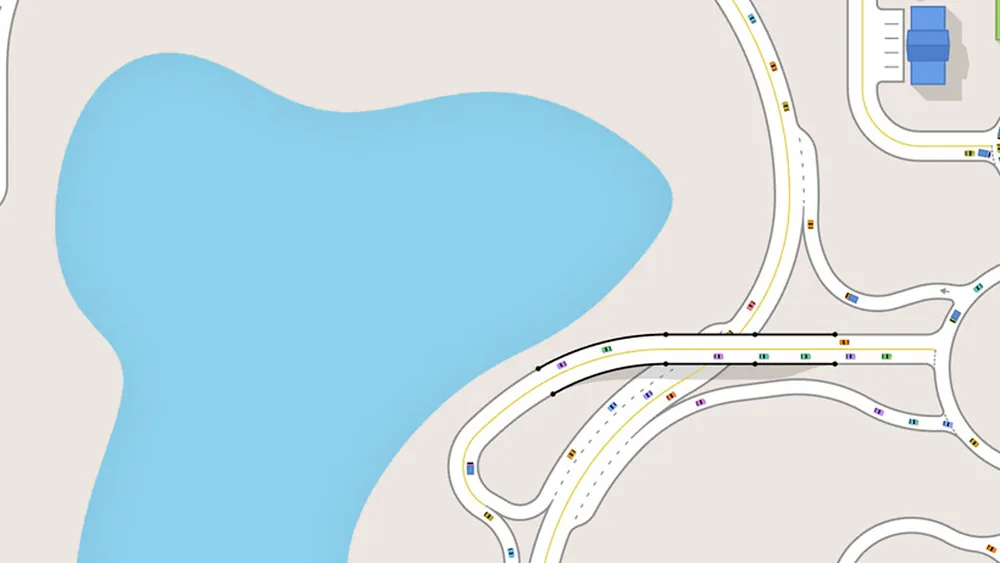
A locked junction is one where cars are inside the junction and cannot leave, so nothing else can enter. The cause is always downstream: an exit is blocked, and the junction fills from the far side.
The fix is never at the junction. Look for:
- An exit road that is full. Widen it, add a second exit, or move the destination.
- A junction immediately beyond that is also locked. Work backwards until you find the first one with a clear exit.
- A roundabout whose exit is blocked. The circle fills and locks, which looks like a roundabout capacity problem and is not.
Once the downstream blockage clears, the junction will empty on its own. If it does not, there is a missing lane connection keeping cars from leaving - check the panel.
Performance in a large city
Trafficity is light, but a very large city with a dense junction in view will drop frames on modest hardware. The cost is drawing dozens of individual cars at close zoom, not simulating them.
Practical fixes:
- Zoom out when you are not inspecting a junction; the simulation keeps running.
- Close other applications during a long build session.
- If a specific junction is consistently slow, it may be a sign that the junction is overloaded rather than a rendering problem - check the queue length.
A junction that stutters the camera is not necessarily a junction that is failing. Confirm with the overlay and the queue behaviour before spending money.
Saves, cloud and version changes
Steam Cloud keeps your cities synced, and Family Sharing keeps them separate. Two things to know:
- A save from an older version may behave differently after a patch. Junction rules, phase options and building requirements can change. If a city suddenly jams everywhere, check whether the game updated.
- Cloud conflicts are rare but real. If you played on two machines offline, Steam will ask which copy to keep. Pick the one you want; there is no merge.
A short diagnostic order
When something is wrong and you are not sure what, run this order:
- Is the building unhappy because of service, pollution or noise?
- Does the route exist at all - is there a junction where it looks like there is one?
- Is the exit clear?
- Are the lane connections present?
- Is the phase timing adequate?
- Only then, is the junction under capacity?
That order costs nothing and prevents most unnecessary rebuilds. The bottleneck diagnosis guide→ expands steps three to six.
Where the data comes from
- Trafficity on Steam ↗ - store description, price and feature list.
- Trafficity news hub ↗ - patch notes and developer posts.
- Steam global achievement percentages ↗ - the public endpoint behind the completion figures quoted here.
Official source: Trafficity on Steam ↗
FAQ
Why is my residential district not growing? Usually a missing service link - no shop, no workplace, or a building placed next to pollution or road noise.
Why do cars not use my new road? It probably leads nowhere, is not properly connected, or is slower than the existing route.
Why does a junction lock up completely? An exit is blocked, so cars cannot leave the junction. Fix the downstream road, not the junction.
Does the game get slower in big cities? Rendering does when you zoom into dense traffic. The simulation itself scales well.