
Trafficity Road Tool Guide: Angles, Lanes and Grids
How the Trafficity road tool works: three-click angled grids, shoulder lanes, lane counts and the drawing habits that keep a road network editable later.
The Trafficity road tool is the part of the game you will use most and the part most guides skip. It has no fixed grid, it lets you place a grid at any angle, and it lets you add lanes to an existing road one at a time. Used well, it produces a network you can rebuild junction by junction for forty city levels. Used badly, it produces roads you cannot widen without demolishing a block.
This page covers the mechanics and the habits. Lane-level behaviour inside a junction is a separate topic, covered in lane connections→.
The three-click angled grid
The fastest way to lay a district is the angled grid: three clicks define an origin, a direction and a spacing, and the game draws a road grid aligned to that direction. The angle is whatever you choose. This is how you get a neighbourhood that follows a coastline or a hillside instead of fighting it.
Two rules keep that grid useful:
- Aim the grid at the junction it will feed. If a district's grid is rotated 30 degrees away from the arterial it connects to, every exit becomes an awkward angled junction. Line the grid up so its main axis points at the arterial.
- Keep the spacing consistent within a district. Mixed spacing is legal, but it produces lots that are hard to fill and streets that change width without reason.
You do not have to use the grid for everything. A single curved road drawn by hand is often better for a boundary or a scenic loop. The grid versus organic page→ covers when each shape wins.
Sketch the district boundary with a single road before you lay the internal grid. It is much easier to adjust one line than to rebuild a grid that overflows a coastline.
Lane counts and shoulder lanes
Roads carry a number of lanes, and the important editing move is adding a single lane to an existing road rather than replacing it. That shoulder lane becomes useful in three places:
- A turn pocket. One extra lane on the approach, connected only to the left-turn movement, so a single left-turning car does not block the through lane.
- A slip lane. A lane that leaves before the junction and merges after it, letting right-turning traffic bypass the signal entirely.
- A merge lane. Extra length on an on-ramp so cars can match speed and slot in instead of stopping.
The mistake to avoid is widening the whole road. A four-lane road through a district center moves more cars into the same junction, which usually makes the junction worse. Widen the approach, not the street.
Where lanes connect
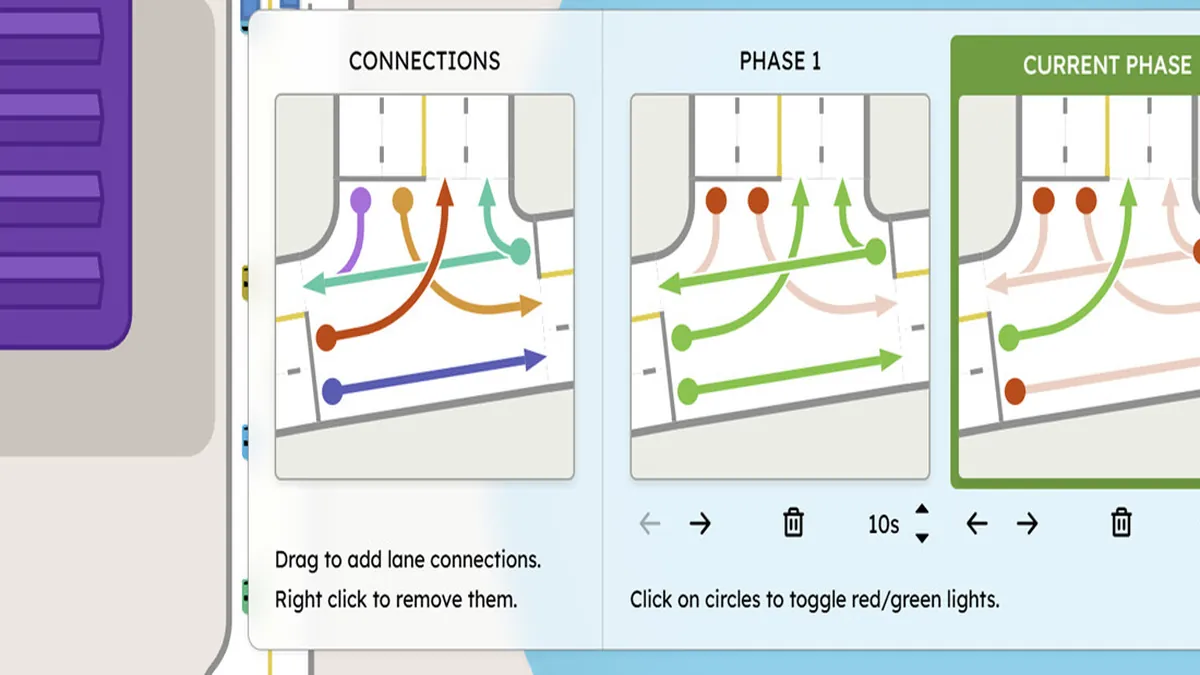
The junction panel is where lane-level design happens. It shows the incoming and outgoing lanes and lets you drag connections between them; the game's own hint in the panel reads "Drag to add lane connections. Right click to remove them." A connected pair means a car in that lane may make that movement. An unconnected pair means the movement does not exist, even if the geometry suggests it does.
That single rule explains most confusing jams. If cars queue in a lane that appears to have a clear exit, the connection is probably missing. If cars cut across two lanes at the last moment, the connection exists but the guidance is poor.
Start with fewer connections than you think you need. A junction where every lane connects to every exit lets cars make late, unpredictable moves. A junction with one lane per movement is calmer, even if it looks restrictive.
Editing without rebuilding
The road tool is forgiving about geometry and unforgiving about structure. Three habits keep a network editable:
- Leave a gap between the arterial and the first building row. Widening later needs space, and a road pressed against shopfronts cannot grow.
- Do not bury a junction inside a block. Junctions need room for turn pockets and slip lanes; a junction surrounded by buildings has nowhere to expand.
- Name your districts in your head by their access point. If a district only has one way in, that road is the district's limit, no matter how wide it is.
Two roads that look parallel may be a fraction of a degree apart, which creates a sliver lot and a strange junction. If a connection looks wrong, zoom in before you build on it.
Roads are not the only tool
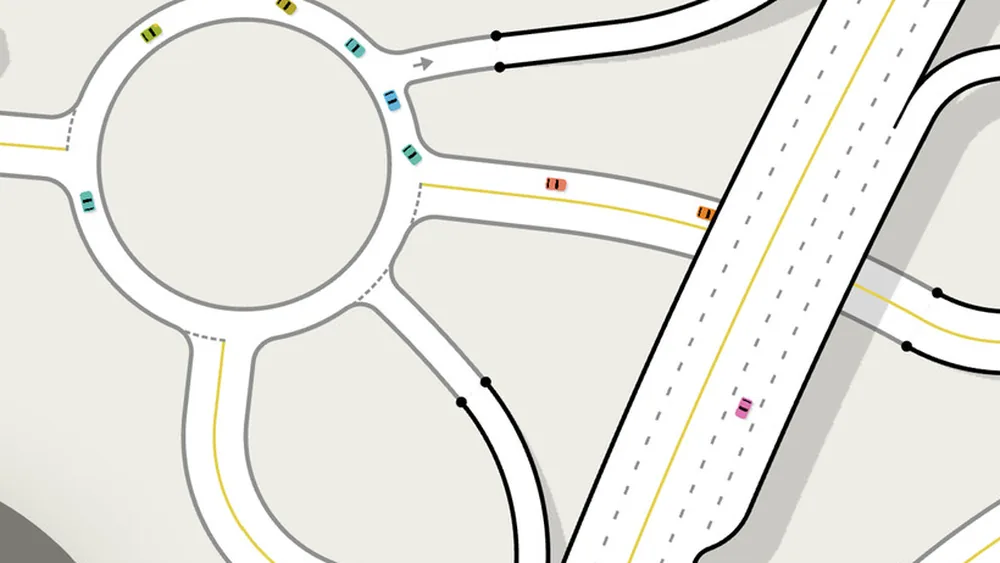
Overpasses and roundabouts let you separate movements that would otherwise conflict. A road that carries traffic straight through a district is a candidate for an overpass or a bypass, not for another lane. The interchange guide→ covers the grade-separated options, and road hierarchy→ explains which roads should be doing which job.
The rule of thumb: if a road's job is to pass through, it should not touch the local streets. If a road's job is to serve the buildings on it, it should never be the fastest route across the map.
Where the data comes from
- Trafficity on Steam ↗ - store description, price and feature list.
- Trafficity news hub ↗ - patch notes and developer posts.
- Steam global achievement percentages ↗ - the public endpoint behind the completion figures quoted here.
Official source: Trafficity on Steam ↗
FAQ
Can I draw roads at any angle in Trafficity? Yes. There is no fixed grid, and the grid tool itself can be placed at any angle.
How do I add a lane to an existing road? Select the road and add a lane in the road editor. The new lane can then be connected individually inside a junction.
Why do cars ignore my new lane? A lane that is not connected to a movement in the junction panel will not be used for that turn. Check connections before assuming the lane is broken.
Can I widen a road after building next to it? Yes, but only if you left space. Roads pressed against buildings have nowhere to expand, and widening will require demolition.