
Trafficity Traffic Lights Guide: Phases and Timing
Set up Trafficity signals: how phases work, green timing, protected left turns, and the phase mistakes that stall a junction.
Traffic lights are the only junction tool in Trafficity that can give a movement priority without blocking another one permanently. They are also the easiest tool to misconfigure, because a signal has three separate settings that interact: which lanes are connected, which movements share a phase, and how long each phase lasts. Get one of those wrong and the junction behaves worse than the bare crossing you replaced.
This page covers the signal editor and the timing decisions. The connection half of the problem is in lane connections→.
What the panel gives you
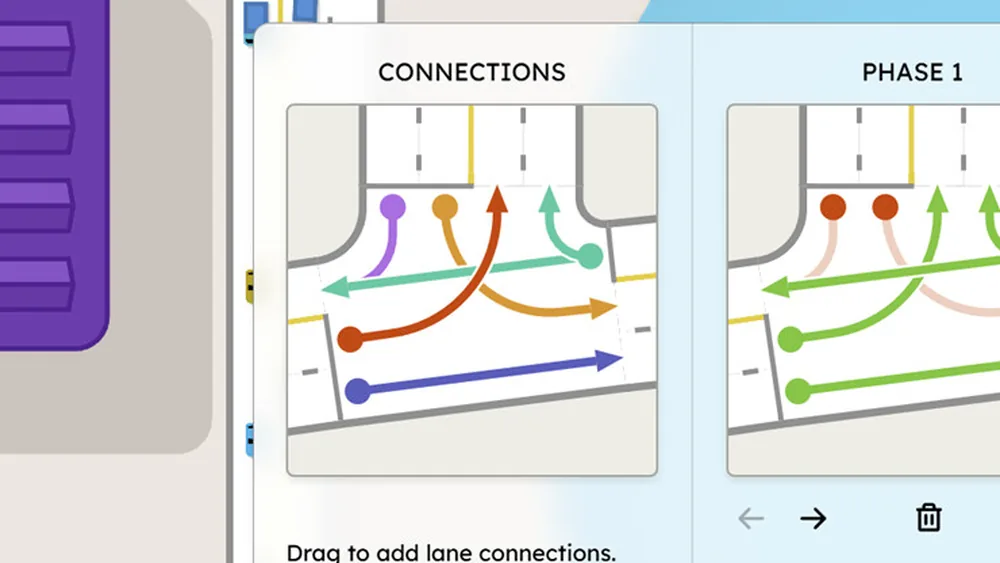
The junction panel has two halves. The left side is the connection editor: incoming lanes, outgoing lanes and the movements between them. The right side is the phase editor, with a phase list, a preview of the currently selected phase, and duration steppers for each phase. The screenshots of the panel show three phases with durations in the five-to-ten second range, plus an add phase control and the note that clicking a circle toggles that movement between red and green.
That is the whole toolkit. There is no cycle-length field and no automatic optimiser. You build a sequence and you set how long each step runs.
Build phases around conflicting movements, not around compass directions. Two movements that do not cross can share a phase even if they come from different roads.
Phase design in four steps
- List the movements you allowed in the connection editor. If a movement is not connected, it cannot be part of a phase.
- Group non-conflicting movements. Straight-through in both directions can usually share a phase if the junction geometry allows it; left turns across oncoming traffic cannot.
- Give each group a phase and order the phases so the sequence makes physical sense.
- Set durations proportional to demand. The phase carrying the heaviest movement gets the longest green.
A two-phase signal - one for the main road, one for the side road - is the correct starting point for most junctions. Add a third phase only when a protected left turn is needed, because every extra phase adds lost time to the cycle.
The protected left turn
The protected left is the reason many players install a signal in the first place. A left-turning car that has to find a gap in oncoming traffic blocks the lane behind it, and one blocked lane is enough to back a queue through the previous junction.
The build is:
- Add a left-turn pocket lane on the approach.
- Connect that lane only to the left-turn exit.
- Give the left-turn movement its own phase, or pair it with a non-conflicting movement.
- Keep the through lanes out of that phase.
The result is a short, dedicated green where left-turning cars clear without negotiation. The cost is that the through movement loses those seconds, so the left phase should be short - just long enough to clear the queue that forms between cycles.
Timing: what the numbers mean
The phase duration steppers are in seconds, and the useful values are small. A phase that runs too short leaves cars queued at the end of the green; a phase that runs too long wastes time that the cross traffic needs.
Working targets to start from:
| Situation | Starting green | Adjust when |
|---|---|---|
| Main road, two lanes | 10s | Queue survives the green: raise by 5s |
| Side road, one lane | 5s | Cars still arriving at red: shorten, do not lengthen |
| Protected left | 5s | Left queue clears early: cut to the minimum |
| Pedestrian-free minor entry | 5s or give-way instead | Flow is trivial: remove the signal |
The pattern to watch for is a phase that ends with cars still crossing the stop line. That means the green is shorter than the queue needs. The opposite pattern - a phase where the junction sits empty for several seconds - means the green is longer than demand, and those seconds are being taken from another movement.
Doubling every phase makes the junction feel calmer and increases the delay for everyone. Fix the heavy movement instead of stretching the cycle.
Signals versus roundabouts
The decision between them is mostly about movement dominance. A roundabout is better when turning traffic is mixed and no single movement dominates. A signal is better when one movement is heavy and the minor movement is light - the heavy movement gets a long green and the minor movement gets a short one.
A signal also wins where a protected left is needed, because a roundabout cannot give a movement priority. And it wins where space is tight, because a compact signal junction fits where a properly sized circle would not.
What a signal cannot do is fix a blocked exit. If cars cannot leave the junction, every phase fills the junction further. Check the road beyond before you touch the timing - that is the first step in bottleneck diagnosis→.
Common phase mistakes
Greening both directions of a left turn at once. The movements cross, and the game will let you do it. Cars will drive through each other's right of way, and the junction will look busy without moving.
Leaving a movement unconnected but in a phase. The phase runs, the light turns green, and no car uses it. Check the connection editor before blaming the timing.
Adding a fourth phase for a movement that could share. Every phase costs lost time. Two well-built phases usually beat four careful ones.
Setting identical durations for every phase. Traffic is not symmetric. The heavy approach should get visibly more green than the light one.
Where the data comes from
- Trafficity on Steam ↗ - store description, price and feature list.
- Trafficity news hub ↗ - patch notes and developer posts.
- Steam global achievement percentages ↗ - the public endpoint behind the completion figures quoted here.
Official source: Trafficity on Steam ↗
FAQ
How do I add a phase in Trafficity? Use the add phase control in the signal panel, then click the movement circles to set which ones are green for that phase.
What green time should I use? Start at 10 seconds for a heavy two-lane approach and 5 seconds for a light side road, then adjust based on whether the queue clears before the phase ends.
Can I make a protected left turn? Yes. Give the left-turn lane its own connection and its own phase, and keep the through lanes out of that phase.
Why does my signal make traffic worse? Usually one of three things: phases that release conflicting movements, a green too short for the heavy queue, or a blocked exit downstream.