
Trafficity Lane Connections: The Junction Panel Explained
How Trafficity lane connections work: drag to add a movement, right click to remove, and the connection patterns that fix left turns, merges and blocked exits.
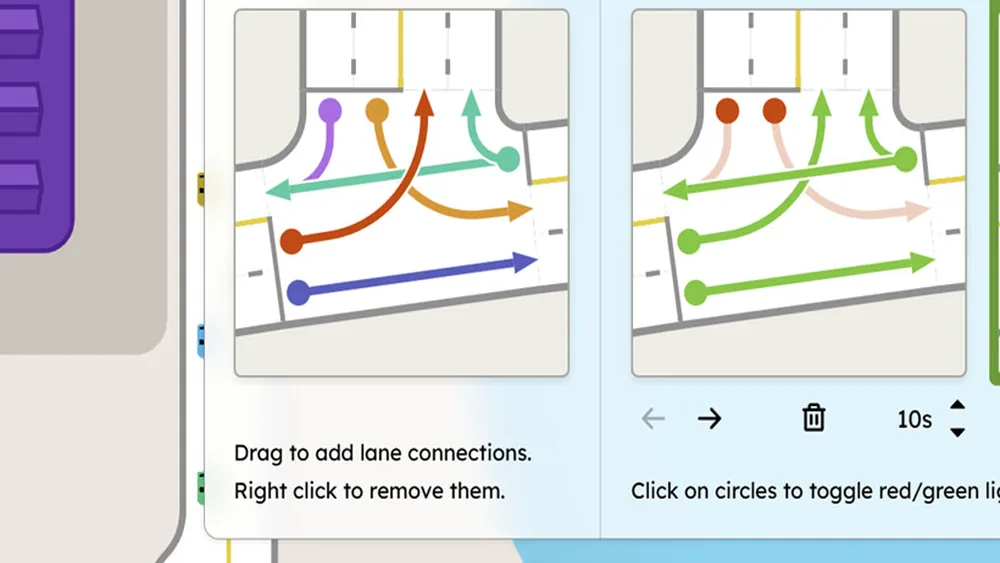
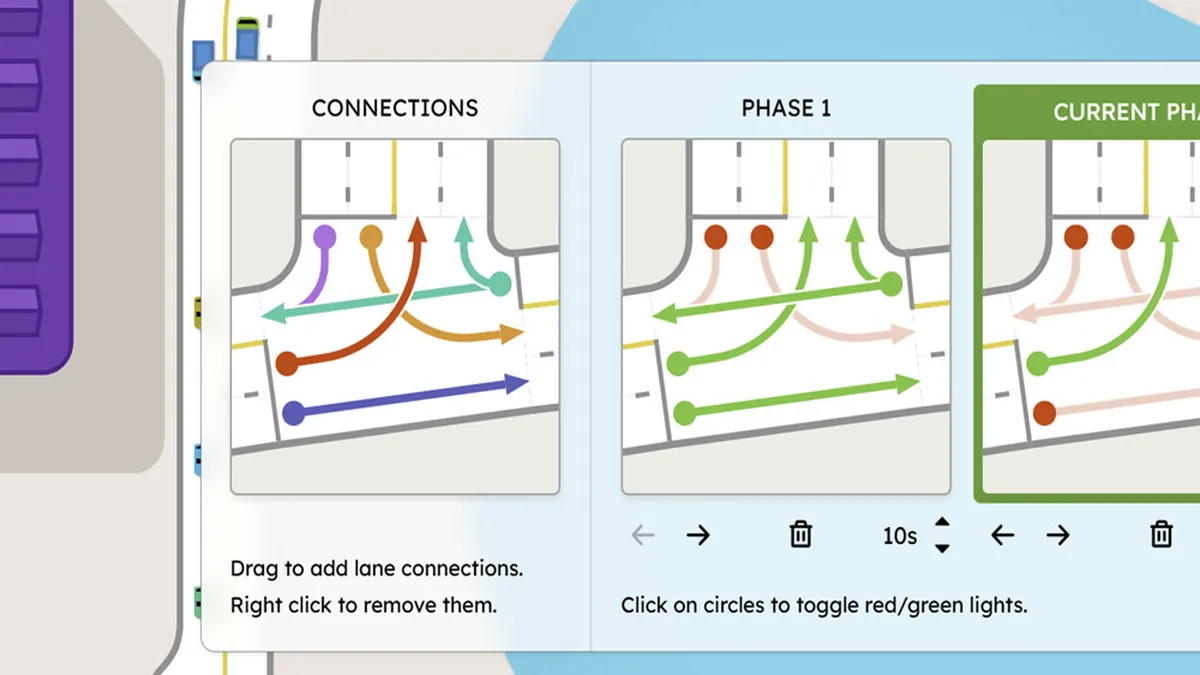
Lane connections are the most powerful and least explained tool in Trafficity. The junction panel tells you the rule in one line - drag to add lane connections, right click to remove them - and then leaves you to work out what a connection actually means. This page is the missing manual.
A connection is a permission. If a lane is connected to an outgoing lane, cars in that lane may make that movement. If it is not connected, the movement does not exist, no matter how the road looks. Almost every "why are cars queuing when the road is empty" question in the game comes down to a missing connection.
The traffic lights guide→ covers the phase side of the same junction panel.
Reading the panel
When you open a junction, the panel shows the incoming lanes on one side and the outgoing lanes on the other, with coloured lines for the movements. The colours are not decorative: they tell you which direction a movement serves, and they make it easy to see at a glance whether a lane has one exit or four.
The panel in the official screenshots also shows the signal phases next to the connections, which is the key insight: connections and phases are the same design decision seen from two angles. A connection that no phase ever releases is a connection that does nothing.
Set the movements you want first, then assign them to phases. Doing it the other way around produces phases that release movements nobody can make.
The four connection patterns worth memorising
The dedicated left pocket. One approach lane connects only to the left-turn exit. The through lanes do not. This means a single left-turning car waits in its own lane instead of blocking everyone behind it. This is the single highest-value edit in the game.
The slip lane. A lane that leaves the road before the junction and connects to the right-turn exit, bypassing the junction entirely. Cars using it never enter the conflict area, which removes them from the signal's workload.
The merge lane. On an on-ramp or a merge, connect the entering lane to the destination lane only, so cars do not scatter across three lanes as they join.
The single-purpose exit. An exit lane that only accepts one incoming lane. This stops two streams converging at the same point and is how you stop late lane changes at the mouth of a junction.
| Pattern | Connects | Fixes |
|---|---|---|
| Left pocket | One lane to left exit | Left-turn blocking the through lane |
| Slip lane | Pre-junction lane to right exit | Right-turn load on the signal |
| Merge lane | Ramp lane to one destination lane | Scattered merging |
| Single-purpose exit | One lane to one exit | Late lane changes and sideswipes |
What bad connections look like
A junction where every lane connects to every exit looks flexible and behaves badly. Cars make late decisions, change lanes inside the junction, and the throughput drops because each movement has to wait for a gap. If the overlay shows a junction that is busy but not saturated, with cars weaving, the connection set is probably too permissive.
The opposite failure is a junction with too few connections. Cars queue in a lane that has only one permitted movement even though a parallel lane is empty. The overlay shows a long queue on one approach and a short one beside it, which is the signature of a missing connection.
Connecting lanes at a roundabout
Roundabouts use the same panel, and the rules are slightly different because the circulating lane is the shared resource. Keep each entry connected to the appropriate circulating lane and to the exit it leads to; do not connect an entry to every exit, or cars will cut across the circle.
For a two-lane roundabout, the usual discipline is: the outer entry connects to the outer circulating lane and the first exit; the inner entry connects to the inner lane and the later exits. Get that wrong and the roundabout weaves internally, which looks like a jam in the circle itself rather than at an entry.
The roundabout guide→ covers sizing and entry count; connections are what make the size usable.
Connections and signals together
Once connections exist, the signal panel becomes a scheduling problem. Each phase turns a set of movements green; the connections decide which movements exist. A phase that greens a movement with no connection does nothing, and a movement with a connection but no phase waits forever.
Two practical rules:
- Give every movement at least one phase. A movement that never gets a green is a permanent queue.
- Keep conflicting movements in separate phases. The panel lets you build phases that would conflict in reality; the game will still honour them, and the result is cars driving through each other's right of way.
The traffic lights guide→ covers phase timing in detail, including protected left turns.
The panel's hint is literal. If a movement disappears after an edit, you probably right-clicked a connection line rather than a lane. Re-add it and check the approach before running the simulation.
A checklist for any junction
Before you run the simulation after editing connections, check four things:
- Every incoming lane has at least one outgoing connection.
- Every exit is reachable from at least one lane.
- The heaviest through movement has a lane that is not shared with a turning movement.
- No two conflicting movements share a phase.
That is a two-minute check that prevents most of the "my junction is broken" cases. If the junction still jams after it, the problem is capacity or the downstream exit, not the connections - see bottleneck diagnosis→.
Where the data comes from
- Trafficity on Steam ↗ - store description, price and feature list.
- Trafficity news hub ↗ - patch notes and developer posts.
- Steam global achievement percentages ↗ - the public endpoint behind the completion figures quoted here.
Official source: Trafficity on Steam ↗
FAQ
How do I remove a lane connection? Right click the connection line in the junction panel. The panel states this directly.
Why do cars queue in an empty lane? The lane is probably connected only to a movement that is blocked or that has a short green. Check the other lane's connections before adding capacity.
Do lane connections affect roundabouts? Yes. Each entry connects to specific circulating lanes and exits, and a permissive set makes the circle weave.
Can I connect a lane to every exit? You can, but it produces late lane changes and lower throughput. One movement per lane is calmer.